Thursday, January 27, 2011

What's new in Android 3.0 Honeycomb

Android 3.0 features
We got our first real taste of Android 3.0 -- "Honeycomb" -- on the Motorola Xoom tablet during CES in early January. It's a pretty big leap from the Android we know and love today, to be sure. But most of what we saw were demonstrations, video of what Honeycomb can and will do.
But today Google released a preview of the Android 3.0 software development kit -- the tools developers need to make applications. Along with the updated SDK, Google's compiled an excellent highlights package. Join us after the break where we'll walk you through the some of the major changes, and what we can expect in the coming year.
Ed. Note: Remember that this is based off a preview of Android 3.0, and things are very likely to change. We'll update when warranted.

Designed for tablets, or at least larger screens

There's been a little back and forth about this, but make no mistake -- Honeycomb is intended for Android tablets. One look at the user interface (UI), and that's plenty apparent. But it's also going to make its way onto smartphones. Matias Duarte -- the UI guru behind webOS who later left for Google -- said as much during a recent interview.
And Google makes no bones about it in the first sentence of the highlights (emphasis ours):
Android 3.0 is a new version of the Android platform that is specifically optimized for devices with larger screen sizes, particularly tablets.
Does that mean your lowly 3.5- or even 4-inch phone won't be getting Honeycomb? Look at it this way: Anything you're holding in your hand as you read this (save for a Nexus S) is waiting on an upgrade to Android 2.3 Gingerbread -- and a good number of us are still waiting on Froyo for our phones.
Point is, when it comes to smartphones "with larger screen sizes," we're not expecting Honeycomb upgrades anytime soon, except maybe for the Nexus S. New hardware later this year is a whole 'nother matter, though.

A brand-new user interface

Holographic UI

Again, hardly a surprise, as we've seen it on the Xoom. It's being referred to as a "holographic" UI. And indeed there's very much a three-dimensional effect going on. (This is going to look way cool once 3D screens become practical.)

Home screens

Android 3.0 visual layout mode
Fear not, multiple home screens haven't gone anywhere. You still have five of them on which to place app icons, shortcuts and widgets. You'll be customizing everything through a "dedicated visual layout mode."

The System Bar

Android 3.0 System Bar
Somewhere, someone at Microsoft is going to go a little nuts over this. But Honeycomb has a "System Bar" that's docked at the bottom of the screen. With it you'll have your notifications (moved from the top of Android 2.3 and previous), system status, a clock and soft navigation buttons.

The Action Bar

Android 3.0 Action Bar
When you're running an app -- say, like gmail -- you'll have an "Action Bar" at the top of the screen. That's another UI element that's very much in line with what you'll find on a desktop computer program -- or Windows Mobile, for those who can stand to think of it.

Multitasking and recent applications
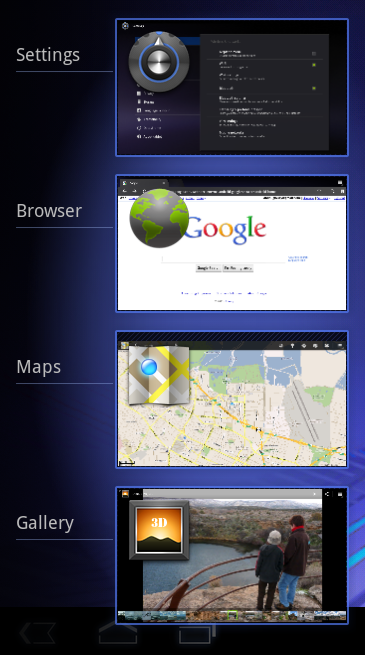
Android 3.0 app switching and multitasking
Hey, multitasking isn't going anywhere. And we're getting a new way to switch from one app to another. There will be a "Recent Apps" list tucked into the System Bar. The list will show you a thumbnail of the app -- in the state that you last left the app.
Yes. This sounds very much like desktop computing to us, too.

A new keyboard

Android 3.0 keyboard
Makes sense. As anyone who's used the Samsung Galaxy Tab or some other Android tablet can attest, simply scaling up a current keyboard doesn't really get the job done.
Third-party keyboards are coming, too, as we know Swiftkey already has one in the works.

Revamped cut/copy/paste

Android 3.0 text selection
This looks a lot like what we've got in Gingerbread, actually. Though going by a screen shot hardly will do it justice. After you've selected text, you can choose an action from the (you guessed it) Action Bar.

New Google apps

We're getting reworked "standard apps" (often called Google apps or Gapps) in Honeycomb.

Web browser

Android 3.0 browser
The browser switches to tabbed browsing instead of windows. There's also an "incognito" mode (borrowing from Chrome). You can automatically sign into Google sites, and sync bookmarks with Google Chrome on your desktop.
Multitouch support has been enabled for JavaScript and other plugins. That means a plugin -- say Adobe Flash -- can now detect more than one finger on the screen. Snazzy. There also are improvements for when you're viewing a non-mobile site.

Camera and photo gallery

Android 3.0 camera app
The camera app has been redesigned for larger screen sizes. You get quicker access to settings such as zoom, focus, flash, exposure, etc. Frankly, those are improvements that we should have in Android 2.2. Let's hope that gets ported over post haste.

Contacts

Android 3.0 contacts
A big change from Android 2.x to Honeycomb is the use of multiple panes on a single screen. Whereas you'd see a contact list, choose a contact and then have that contact fill the entire phone screen, it'll now do so on multiple panes. (Google's also called these "fragments.")

E-mail/gmail

Android 3.0 e-mail app
The stock e-mail app is getting quite the makeover. And we presume the gmail app (which you see here) gets it, too. Like contacts, it'll take advantage of the dual-pane UI. You'll also be able to select multiple messages and act on them, tell attachments to sync at a later time, or use an e-mail widget.
And -- this is our favorite -- you'll be able to drag and drop items, like you see in the image above. That's new in the Android 3.0 framework and can be used in various apps.

Other improvements

High-performance graphics

What's on the screen is just as important as the technology driving it. And in Android 3.0, the graphics get a major boost. Open GL hardware acceleration has arrived for 2D graphics. And for 3D graphics, there's a special renderscript that serves as an API for 3D scenes, as well as a universal shader language. That's nerdspeak for "It'll look good and be fast."

Multicore processor support

This is a big one, as dual-core processors have finally arrived. But, strangely enough, Android hasn't had true support for them until Honeycomb. And Google says that applications that are only written to take advantage of one core still can benefit from the change.

Bigger and better widgets

Android 3.0 widgets
Widgets are getting bigger and better. You can flip through 3D stacks, have grids or lists. You can also interact with widgets in new ways, including scrolling and flipping the items within a widget.

Multimedia and connectivity

Nerdy, but important. There's new HTTP live streaming, meaning you can feed Android an M3U playlist URL and it'll know what to do with it. Most important, it means you'll possibly be able to watch Apple keynotes now. :p
There's also a new DRM -- digital rights management -- framework. That's the thing you hear about when the record labels and other publishers accuse you of stealing their work.
There also are new stereo Bluetooth profiles, so apps will be able to better interact with your accessories.

New enterprise support

This has been a big headache for a lot of you, we know. We'll just crip from Google here and tell you that "developers of device administration applications can support new types of policies, including policies for encrypted storage, password expiration, password history, and password complex characters required."

Older phones, and older apps

The good news: Android 3.0 is fully compatible with current Android applications. That's not to say you won't see updates for Honeycomb, but your favorite app should at least be functional even if the dev doesn't touch it.
But like we said at the outset: We'd be real surprised at this point if anything but the most recently announced smartphone gets updated to Honeycomb. In fact, we'd go so far to say that a dual-core developer phone might not be out of the question in the next six months. (Boy, we've got our fingers crossed for that.)

More's in store

So those are the broad strokes of Android 3.0. The APIs could still change. Features may be added or removed. We'll updated this post as necessary. But in the meantime, sit back, relax, and enjoy the preview Google gave us at the beginning of January.

 
From Androidcentral.com
By Phil Nickinson

New Sony Ericsson Xperia Arc video and camera samples


Sony Ericsson has been rather forthcoming when it comes to the Sony Ericsson Xperia Arc since it received its official announcement. They've given up close and personal looks at the camera improvements and have given us plenty of videos to watch as well. Interest in this device is starting to rise, especially after Sony Ericsson stated they are committed to the Android platform, maybe that's why we're seeing lots of camera and video samples. Speaking of which, a new batch has now turned up on YouTube and Flickr. Hit the break to see what we're talking about and shout out to Mikael for sending these into us. Also, be sure to check out our own hands-on. [XBlog]


From Androidcentral.com
By Chris Parsons

[Android-Apps] - Aeon Racer


If gaming on your Android device is something that you enjoy to do, and old-fashioned games catch your attention, Aeon Racer is a game you will not want to miss out on. This game has a retro feel like Asteroid but is fast-paced and is sure to keep you on your toes. While trying to fly your spaceship through the levels, which progressively contain more and more barriers, the intensity increases since your ship continues to go faster and faster.
The game offers three different galaxies, each of which contains five levels which continually get harder and harder as they go on. The game is controlled by simply tilting your device to maintain control of your space ship as you cruise through the levels. If you get through the levels and are looking for more, there is an infinite mode, which allows you to play until you are done.Aeon Racer is $2.18 in the Android Market. Hit the break for download links.

[review] - Sony Ericsson Xperia Play (PlayStation Phone)


Oh yes. After all the unbearable teasing since we unveiled the first ever photos of the PlayStation Phone, we've finally managed to get hold of the real deal for an in-depth preview. Honestly, we couldn't wait any longer with this thing floating around in China; we'd otherwise have to wait until MWC, where we expect the phone to be launched as the "Xperia Play" (and we shall refer to this name henceforth). Before you pop the cork for us, do bear in mind that what we're seeing here is subject to changes, so don't be alarmed by any missing features or exposed cables in our preview. When you're ready, head right past the break to find out what Sony Ericsson's cooking up.
More images

Hardware
In case you haven't been keeping your eyes peeled open for news about this intriguing device, here's a little roundup of what we know so far: various screenshots have revealed the codenames "Zeus" plus "R800i," and it's now clear that this HSDPA phone with Gingerbread will be marketed under the Xperia brand, with a hint of PlayStation here and there. In terms of specs, we can confirm that the Xperia Play has a 4-inch multitouch 854 x 480 LCD, which is what the X10 has as well. In fact, the LCDs on both phones have similarly good color performance and viewing angles, but upon closer inspection we noticed that the Xperia Play's LCD is brought closer to the glass, which may be why it produces a slightly darker black. Rumor from the Far East also has it that, like the Xperia Arc, the Xperia Play's screen is powered by a Bravia engine for improved video playback.

Even though we have the actual device with us, we're still unable to verify our original tipster's claim that it's powered by a Qualcomm MSM8655 chipset; even the Chinese teardown struggled to get past the chip's shield cage to check its ID. Anyhow, both Quadrant and Android System Info indicate that there's a single-core processor inside that clocks from 122.88MHz to 1GHz (and note that the MSM8655 can even go up to 1.2GHz), and it's coupled with an Adreno 205 GPU. This combo, along with Gingerbread and the generous 512MB of RAM, scored a chart-topping 1,689 on Quadrant and an impressive 59fps on Neocore. Other benchmark scores include: about 35 MFLOPS on Linpack, and around 43fps on NenaMark (tying with the Tegra 2-packing LG Star).

Sadly, these numbers fail to reflect one major flaw on our Xperia Play: WiFi doesn't work. Hopefully this is simply to do with a faulty driver for the Broadcom BCM4329 wireless chip (capable of 802.11n WiFi, Bluetooth 2.1 with EDR, and FM receiver plus transmitter) rather than the prototype being physically faulty. Touch wood.

Before revealing the gamepad underneath the screen, you'd probably first notice the four shiny Android soft keys below the screen. Yep, all four of them -- back, menu, home, and search -- are there, although for some reason the middle two buttons are swapped around in the OS. It could well be a last minute firmware change that occurred after the device was manufactured, or maybe SE is still toying with the layout. Speaking of which, the label in the battery bay indicates that this device was manufactured in the third week of 2011, but turns out this is all fake -- even the FCC ID on the back label actually led us to a filing for the X10, so there's no telling how recent this prototype is.

The remaining physical buttons on the outside include the tiny power button at the top right corner, and the volume rocker right between the two gamepad triggers on the right. Both buttons will take some getting used to: the former being a tad too small, and the latter being in an awkward location for our right thumb or left index and middle fingers, depending on which hand you hold the phone with. Also, if you're not careful when snapping shut the battery door, a slight dislocation may cause the power button to recess. We had a little panic when that happened to us yesterday, but the problem disappeared after we put the door back on properly. Users will just have to watch the small tolerance there, but hey, this might get fixed before launch so who knows.


Despite the aforementioned design flaw, the only other real build quality issue lies on the glossy battery door itself -- it's very flimsy, so removal requires popping up one end of the door, and then running our fingernail along the seam. This certainly isn't a problem on the X10, as its matte gray door simply pops out in its entirety when you lift it up from its bottom slit. On a less serious but potentially annoying matter, after just a few days of careful usage we're already seeing a lot of light scratches on the outside of the door, and it'll only get worse since the back is curved -- good for your hand, but also good money for case makers.

Putting the battery door aside, what you see underneath is a compartment for the phone's 1500mAh battery (interchangeable with the X10), which can provide a full day's worth of relatively active 3G connection and plenty of snapshots. Further up you get the slots for your SIM card and microSD card, meaning you can change them without taking out the battery. You'll also notice that the camera lens pokes out of the battery door to avoid an overlay that could potentially distort images, as we've seen on the Dell Venue recently -- we'll come back to the camera later.

What caught our attention is the little hole that's labeled as "2nd mic" above the LED flash -- it could very well be for noise cancellation à la Nexus One, but it didn't seem to be enabled in our noise test. Still, call quality is decent on both ends of the line, although the stereo loudspeakers on the USB port side could use a little boost for phone calls -- they're definitely louder when playing music. You can, of course, just plug in your earphones to actually enjoy the music, although strangely all of our iPhone-compatible handsfree kits failed to work as even just earphones on the Xperia Play; it's the same with the X10 series handsets, so be warned.

 It's time to cut into the meat. Push the screen upwards to about half way and the spring mechanism will take over, thus uncovering the PlayStation DualShock-style gamepad, except there is only one pair of shoulder buttons instead of two, plus we've yet to see if the touchpads can substitute the DualShock mechanical sticks -- they are no doubt reserved for games that are made specifically for the Xperia Play. We should point out that the D-pad also works on Android natively, which is good news for those who are accustomed to optical trackpads or trackballs.

Since we have little experience with the PSP Go, we asked a good friend of ours to compare his experience on our Xperia Play with his 50 to 100 hours of play time on his PSP Go. Interestingly, one of his first reactions was that the phone is less well balanced than the bottom-heavy PSP Go, and then he noted that the shoulder buttons could do with more depth, but this would obviously require a thicker body. That said, we both agree that the Xperia Play is still comfortable to hold, and also it has a better build quality than the PSP Go. We also noticed that the screen can be wiggled gently when closed (such phenomenon is commonly known as the "oreo effect" amongst Palm Pre users), but it's nothing major.


Software
We've been using this Xperia Play as our main phone for a few days now, and to our surprise, it's been very snappy and fairly stable for the majority of the time -- we've only seen one reboot max per day, and removing the resource-intensive Timescape widget certainly helps, too. On a similar note, Mediascape is no longer an app; instead, it's been split into several widgets -- music player, gallery browser, and media shortcuts -- that can prompt their corresponding multimedia apps.

Considering what a nightmare the X10 is, this prototype's performance is a big surprise yet also looking promising. As with the Nexus S, our Xperia Play also got the same bunch of Gingerbread goodies, notably the good old mobile WiFi hotspot, new status icons, new text selection tool, and glowing visual aid when you hit the top or bottom of scroll menus. No major change for the keyboard -- it appears to be the same as the X10's but with sharper graphics. The stock music app is replaced by SE's own version, whereas the stock gallery app is good to stay. We tested the latter for video playback capability and turns out the phone can easily handle 720p H.264 video clips, provided that their AVC profiles don't exceed level 3.1 (you can use a free desktop utility called MediaInfo to check your video files' AVC profiles). Sadly, AVI or MKV files are not natively recognised.
Having learned from its painful lesson from the X10, SE's shifted its focus from just adding apps to actually improving Android's usability. For the Xperia Play as well as the Xperia Arc, SE's added a homescreen feature that's very similar to HTC Leap but more cunning: pinch anywhere on any homescreen and the phone will bring all the widgets onto one screen; tap on a widget and you'll be taken to its corresponding homescreen. Pretty nifty, huh? Except right now it can get rather laggy even with the Timescape widget removed, so hopefully we'll see something slicker at MWC.

Another nice SE feature is the sort filter in the horizontal-scrolling apps menu, which allows custom sorting, sort by alphabets, sort by usage frequency, and sort by installation time. There's also a quick release button at the bottom right of the menu that floats your icons, so that you can drag them around to rearrange the list (very much like how you move icons in iOS). Of course, we didn't have many interesting apps to fiddle with earlier on -- the only interesting app preloaded is the mysterious PlayStation Pocket, which appears to be a simple managing tool for downloaded games. And where would one obtain such games? We're guessing there'll be a separate market app for that, a bit like how the X10 has the PlayNow store that no one uses.
To quench our gaming thirst, we went ahead and installed a couple of emulators: one for the original PlayStation, and one for GameBoy Advance (oh, the irony). Discounting the touchpads, we were able to map all of the gamepad controls in both apps, and guess what? The handful of games we tried -- Ridge Racer Revolution, Tony Hawk's Pro Skater 4, Gundam Battle Assault 2, and Super Mario Bros. 4 -- all ran pretty well. Have a look in the video above, but do excuse our rusty gaming skills.

Note: for some reason all the screenshots came out with weird colors, and it looks like the Chinese sites had the same problem. A quick peek in Photoshop indicates that the red channel is missing. And no, the screenshot apps don't work either, as the phone isn't rooted. We've therefore changed most of them to a more eye-friendly black and white for the time being.
More images for screenshot
Camera
We've already heard the bells and whistles of the Xperia Arc's 8 megapixel Exmor sensor, but with no sample photos on hand for comparison, it's difficult for us to judge whether the Xperia Play's 5 megapixel camera benefits from the same technology. Regardless, we're impressed by most of what we got: sharp pictures, vibrant colors (although red might be a bit strong), and fine macro shots. That said, we did have to kill a few night shots, as the lack of tap-to-focus feature in the stock camera app meant we had to take multiple shots to ensure the autofocusing was right; and then there was also this weird bug where the viewfinder is actually showing a cropped area instead of the entire capture space. More annoyingly, there's no 720p video recording -- the best we get is 800 x 480, but we bet SE will eventually slap on its own camera software which will fill the gap, as well as potentially further improving picture quality to suit its taste.

Wrap-up
Well, having touched the actual gamepad on an Xperia Play, we'd be lying if we say we're not further tempted by it. That said, there are still many questions left unanswered: how will the games be billed and delivered? How much will they cost? And most importantly, how much will the phone itself cost? Well, that's what MWC's for, and hopefully by then the Xperia Play will have a well polished OS as well as a sturdier battery cover. Meanwhile, we'll continue to work on our combo tricks on Tony Hawks' Pro Skater 4.

From Engadget.com
By Richard Lai

Sanjay Jha says multiple Motorola tablet sizes coming, hints at Atrix on other carriers


Can't say this is any surprise, but Sanjay Jha just confirmed on Motorola's earnings call that he "sees good reason" to eventually release an entire family of tablets at "different multiple different display sizes and price points." Specifically, Jha mentioned 7-inch tablets, and later said that consumer demographics like kids, teenagers, and "women" want different things from a tablet than enterprise and professional customers -- which sounds suspiciously like Jha doesn't think women want a single device for work and home, but we'll give him the benefit of the doubt, since he's not always the smoothest speaker.

As for the Atrix, Jha simply said that "you will see our diversity in the retail channel as well with other carriers in the US," which certainly sounds like it'll hit other carriers once the AT&T exclusivity runs out. How long that exclusivity is, we don't know -- but keep in mind that the Droid Bionic is very nearly the same phone, so there's a chance a software update will bring that sweet docking action to the red side of the market in the future. And if not, we're sure the hacking community will have it covered.
From Engadget.com
By Nilay Patel

Motorola Atrix 4G and Xoom tablet launching at the end of February, Droid Bionic and LTE Xoom in Q2


Motorola had one of the best CES showings of any company in recent memory, and now we've got some rough ship dates for all that new gear: CEO Sanjay Jha just announced on the company's earnings call that the Atrix 4G for AT&T and 3G Xoom for Verizon will arrive at "the end of February," while the LTE-enabled Droid Bionic and LTE Xoom will arrive at "the end of the second quarter" as previously promised. That sounds good to us -- and with that earlier Best Buy leak suggesting the Xoom will hit on February 17, we're hoping that Moto's taking a long view of when the end of February actually begins. Even better, a late February Xoom release supports those rumors that Honeycomb will be generally released in March, which is when the real Android tablet invasion will begin. It's all happening, folks.

Update: Oh boy. Jha followed up his Xoom comments in the Q&A portion by hinting that the Xoom might slip to March, but that he's very confident they'll make their timeline. Fingers crossed.


From Engadget.com
By Nilay Patel

HTC's newest Android flagship phone revealed


Why bother waiting for its official Mobile World Congress reveal in February when you can view the newest HTC flagship today? The touchscreen slate prototype (notice the serial number stamped along the bottom of the handset's face) you're looking at above matches the leaked Pocketnow render exactly including the arcing earpiece and isolated front-facing camera with chrome ring. It was just spotted by an eagle-eyed tipster while waiting for a Taipei metro system. Sorry Windows Phone 7 fans, this baby is Android through and through. And seeing it in the wild lends credence to all of the HTC devices pictured in that leak. A couple more snaps after the break.


Update: Seems our tipster might have taken these images (without attribution) from the same Mobile01 forum as the other leaked HTC.
[Thanks, LIMIX]

From Engadget.com
By Thomas Ricker

HTC's buttonless slate spotted in the furry wilds


 A second HTC phone to escape the netherworld of disputed renders has just been discovered. This touchscreen slate for Verizon lacking a front-side camera was last seen in the Pocketnow leak but is now snuggled up with a Harrods bear in a Chinese user forum. How cozy. Better yet, we've now got a view of the Droid-Incrediblish backside showing a dual-LED flash. Again, no detail to confirm but we'll bet it's announced with Android at a Mobile World Congress press event in February.
[Thanks, LIMIX]


From Engadget.com
By Thomas Ricker